
 Definition:
A dashboard is a visual interface that brings together selected indicators, metrics and data to monitor a process, objective, system or area of activity. It combines elements such as headline figures, charts, tables, alerts and controls to provide a summary view and support exploration of the information.
The name comes from the analogy with a vehicle dashboard, which concentrates the signals needed to understand its status. In a digital context, a dashboard is not simply any graphical user interface: its primary function is to present relevant monitoring information. It can prioritise an overview while also providing tabs, filters or access to further detail.
What a dashboard is used for
A dashboard turns dispersed data into a view organised around a particular need. Its most common functions are:
- Monitoring: Showing the state of an activity through selected indicators and comparisons with targets, periods or benchmarks.
- Detecting changes: Making trends, deviations, anomalies or points that require closer examination visible.
- Comparing: Contrasting products, campaigns, channels, teams, territories or other segments using common criteria.
- Communicating: Sharing a consistent reading of the data among the people involved in a decision or process.
The selection depends on the user and task. An operational team may need frequent data and alerts, while management may require a periodic summary. Personalised dashboards adapt sources, indicators and levels of detail to this context.
Dashboard elements
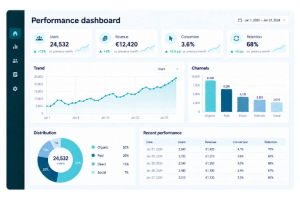 A dashboard can combine different components, but each one should help answer a question or interpret the state of the activity:
- Indicators: Metrics and KPIs connected to defined objectives or processes.
- Context: Periods, targets, previous values, averages or benchmarks that make a figure interpretable rather than isolated.
- Visualisations: Charts, maps, tables and other data visualisation resources chosen for the relationship that needs to be shown.
- Controls: Filters, selectors, segmentation controls or detail paths that support examination when this interaction is useful.
- Source and refresh: The source, update date, coverage and definitions needed to understand what the data represents.
Refresh can be continuous, scheduled or manual. The appropriate frequency depends on how quickly the activity changes and when a variation could lead to action. Daily data is not necessarily better than weekly or monthly data when the monitored process does not require greater frequency.
Types of dashboard
A common classification distinguishes dashboards according to their main use:
- Operational: Tracks short-term activity, volumes, incidents, capacity or task completion and may require frequent updates.
- Analytical: Supports comparisons, segmentation and exploration to examine relationships, possible causes and changes in the data.
- Strategic: Summarises indicators connected to medium- or long-term objectives and supports reviews of progress, priorities and deviations.
These functions can coexist. One environment may provide a strategic summary and access to operational or analytical views, provided that the hierarchy and permissions are clearly defined.
Design and interpretation
Design starts by identifying who will use the dashboard, which decisions it needs to support and which questions it should answer. Adding every available metric reduces clarity and can conceal important signals. Visual hierarchy should direct attention without exaggerating differences through misleading scales, colours or sizes.
Indicators require consistent definitions. Changing the period, filter, formula or analysed population can alter a result even when its label remains the same. Displaying units, dates, comparisons and active filters helps people interpret each figure.
Dashboard quality also depends on its sources. Incomplete, duplicated or delayed data, or information combined using incompatible criteria, produces a misleading representation. A dashboard supports observation but does not replace data validation or explain the causes of a change by itself.
Legibility needs to be checked on the intended devices and against accessibility criteria. Colour should not be the only signal, text and values must remain readable, and interaction needs to preserve the context of the displayed data.
Dashboards, reports and Business Intelligence
A visualisation represents a particular relationship through a chart, map, table or another device. A dashboard combines several visualisations and indicators to provide a coordinated view. A report commonly develops analysis with more context, text, pages or detail, although the boundaries between both formats vary by tool and organisation.
Business Intelligence has a broader scope: it covers processes, models, technologies and practices that turn data into useful information. A dashboard is one possible interface for consulting and monitoring that information. Tools such as Power BI can build dashboards and reports, but their particular features and terminology depend on the product.
A dashboard is useful when it summarises relevant information with enough context for interpretation. Its value does not depend on the number of charts or on fitting everything into one screen, but on the relationship between the selected data, the user’s need and the decisions it is intended to support.